EMTSim
NewVersion 1.0 for Windows

Electromagnetic transients, solved on your desktop.

Draw a power circuit, press Run, and see every switching event, fault and travelling wave. Dommel's nodal method in fast C++, with a circuit editor that opens in your browser.

Windows 10 & 11 · x64 and ARM · free up to 10 nodes
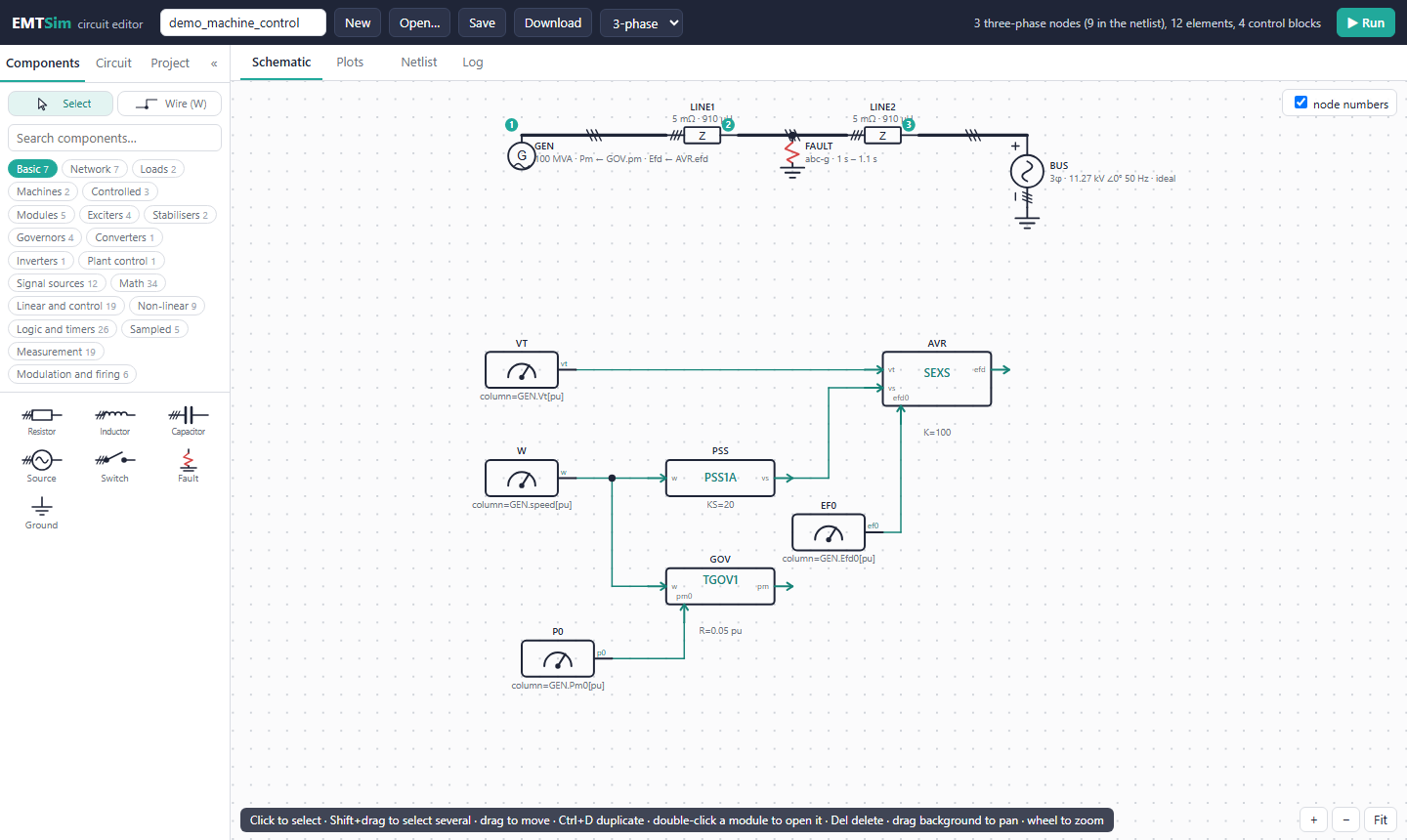
demo_machine_control.net · EMTSim circuit editor
The EMTSim editor: a generator with an exciter, stabiliser and governor feeding two lines and a fault
Dommel's nodal methodtrapezoidal companions
Exact switchinginterpolated instants
Verifiedvs analytical solutions
Plain C++17no dependencies
Features

A complete EMT toolbox.

Every plan has every feature. Plans differ only in the size of circuit you can run.

Draw and run

A schematic editor in single- and three-phase modes, with a checker that names the part and says how to fix it.

Switching done right

Interpolation to the exact switching instant, and chatter removal by detection, root matching or the PSCAD method.

Lines and transformers

PI sections, Bergeron and frequency-dependent (J. Marti) lines from the tower geometry, and saturating transformers.

Machines and power electronics

Synchronous and induction machines, diodes, thyristors, IGBTs, surge arresters and voltage-dependent loads.

Controls and a model library

More than 100 control blocks, with exciters, stabilisers, governors, converters, and grid-forming and grid-following inverters.

Steady-state start, frequency scans

A power-flow start puts every machine and control at its operating point; scans show the network's impedance.

Readable netlists

Every drawing is a plain-text circuit.

What you draw is saved as a netlist you can read, compare and keep under version control. Modules and parameters let you build a model once and use it many times.

  • Three-phase sources, breakers, lines and transformers
  • Modules with ports and parameters
  • The drawing travels inside the same file
fault_clearing.net
# Fault clearing and reclosing on a 132 kV line
.tran 0.00005 0.25

V3  1 2 3  107778 0 50  1 0.05 2 0.12   # GRID
SW  1 4  closed 0.08 0.165 czero   # BRK.a
SW  2 5  closed 0.08 0.165 czero   # BRK.b
SW  3 6  closed 0.08 0.165 czero   # BRK.c
PI3 4 5 6 7 8 9  2.5 0.065 4.5e-7 7.5 0.2 3e-7
MOV 7 0  172000 1000 26   # surge arrester
Results you can trust

Checked against theory, model by model.

The verification manual compares every model with its analytical solution. The solver refactorises only what a switch changed, so large networks stay fast.

  • Backward-Euler half steps where switching needs them
  • Sparse LDLᵀ with partial refactorisation
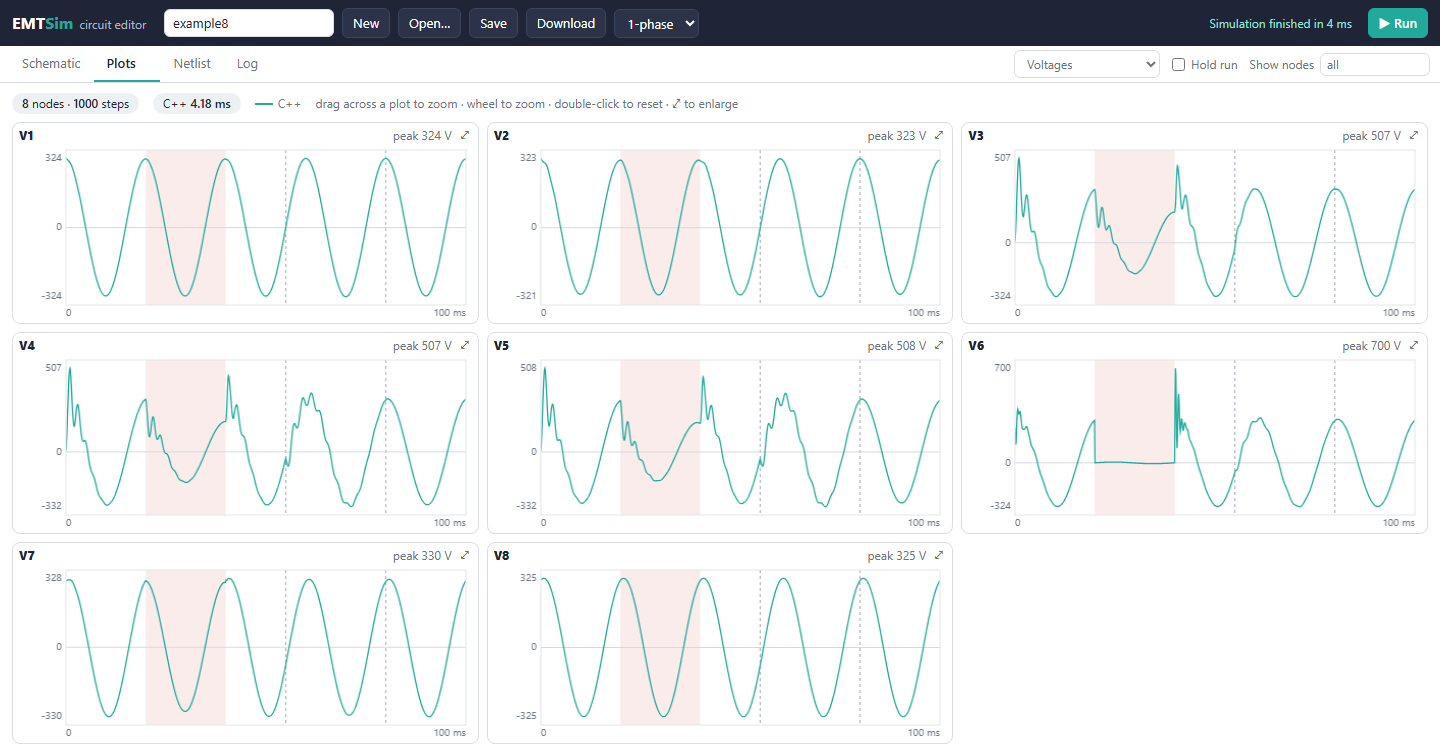
  • Zoomable plots of every voltage and current
Plots · example8
Node voltages of an 8-node network during a fault and a breaker operation
Get started

Up and running in three steps.

The free version needs no card: create an account, install, and simulate.

Create an account

Choose the free version or a larger plan. Paid plans are monthly and can be cancelled at any time.

Download and install

Download the installer, double-click it, and start EMTSim from the Start menu.

Sign in to the app

Press Sign in at the top right of the editor with the same account. Your plan follows you.

Pricing

Simple, per-month pricing.

Start free. Move to a larger plan when your circuits grow.

Free

$0
circuits up to 10 nodes
  • Every model and feature
  • All example circuits
  • No card needed
Download free

100 nodes

$2.99 / month
circuits up to 100 nodes
  • Distribution feeders and plant models
  • Machines and converters
  • Cancel at any time
Choose 100 nodes

1000 nodes

$9.99 / month
circuits up to 1000 nodes
  • Transmission networks
  • The IEEE 9-bus and larger systems
  • Cancel at any time
Choose 1000 nodes

Prices in US dollars. Payments by Stripe; we never see your card. A node is a connection point other than ground; a three-phase bus counts as three.

FAQ

Questions.

How do I get my plan in the app?

Sign in at the top right of the EMTSim editor with your account. One download serves every plan: the app reads yours from your account.

Does it work offline?

Yes. The free version always does. A paid plan keeps working for 3 days after it was last confirmed online.

How many computers can I use?

A plan is for one person. Sign in on the computers you use, and sign out the ones you no longer use from your account page.

How do I change or cancel my plan?

On your account page: upgrade there, or open Billing to change your card, see invoices or cancel. A cancelled plan stays on until the end of the period you paid for.

What do I need to run it?

A 64-bit Windows 10 or 11 PC (Intel, AMD or ARM) and a web browser. The installer brings everything else.

Where are my circuits saved?

On your own computer, in Documents\EMTSim. Nothing you draw is sent to us.

Start simulating today.

Free for circuits up to 10 nodes. Upgrade when you need more.